Oculus Rift CV1 on Linux: Introducing RiftLinux
I use Linux full time, and I still love my Oculus Rift CV1. That used to mean rebooting into Windows every time I wanted to fly in VTOL VR. Not anymore: RiftLinux is an Oculus Rift CV1 driver for Linux that I built so the CV1 just works. Full 6DoF tracking of the headset and both Touch controllers through the original Constellation sensors, in SteamVR and in OpenXR apps, installed from a single package. No Windows, no Oculus app, no Meta account.
Here it is running VTOL VR on Ubuntu with GNOME, through SteamVR and Proton:

Why I built a Rift CV1 driver for Linux
The CV1 is a 2016 headset, but it still holds up well as a lightweight PC VR headset with OLED panels, and plenty of people have one stored away somewhere. I have one, and I wanted to use it without leaving Linux. Switching to Windows just to use the headset was getting painful, with Windows updates that took forever and Meta’s support for the CV1 on Windows getting worse.
On Linux there were two options, and neither got the CV1 fully working:
- OpenHMD: no longer actively maintained; its last release was in 2019.
- Monado: CV1 support unknown without OpenHMD, with a few pull requests still coming together.
There is also a principle here. Hardware should keep working on the system its owner chooses. A Rift CV1 is still a good headset, and it shouldn’t turn into e-waste because one vendor’s software moved on.
How Rift CV1 tracking works on Linux
The CV1 tracks itself from the outside in. The headset and each Touch controller carry infrared LEDs at known positions. The Constellation sensors are cameras that see those LEDs; from where each LED shows up in a sensor’s picture, RiftLinux works out where the headset and controllers are and which way they face, and each device’s IMU (gyroscope and accelerometer) carries the motion between camera frames.
Here’s how well that works:
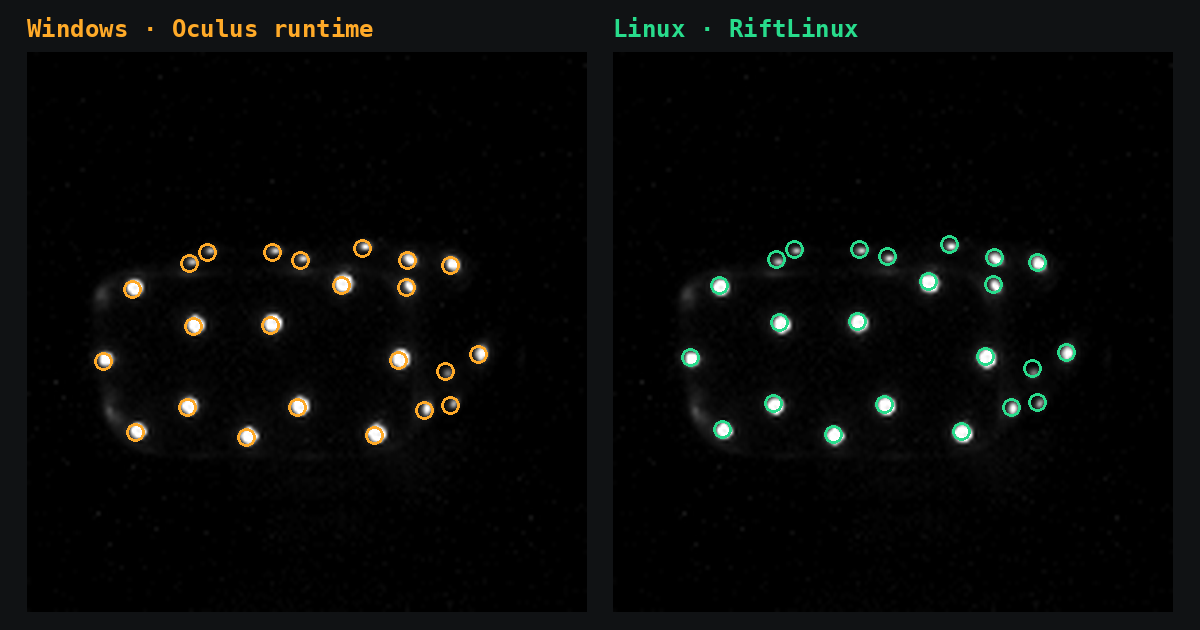
That’s one frame from a Constellation sensor, captured on Windows: on the left, the headset’s LEDs where the Oculus runtime tracked them; on the right, where RiftLinux tracked them from the very same frame. They line up. Over the first part of that recording, RiftLinux’s headset pose matches the Oculus runtime’s to within 4.7 mm and 0.28° (median).
RiftLinux is a modified Monado, specialized for full Rift CV1 support, and what makes the CV1 work was built for RiftLinux: 394 of the 410 commits it adds on top of Monado are its own, each tested on the real hardware or against recorded sessions. The highlights:
- Tracking measured against the Oculus runtime. I captured the sensors’ camera frames over USB on Windows, together with the poses the Oculus runtime computed from them, then ran RiftLinux’s tracker on the same frames: for each kind of movement, it keeps the Touch controllers tracked within 1-2 percentage points of what Oculus managed.
- Touch controllers that stay where your hands are. Mirrored and flipped poses of the LED ring resolved with each controller’s own sense of gravity, edge-on and few-LED views solved, each controller’s IMU and gyro calibrated, and sunlit spots in bright rooms kept out of the search, so tracking holds by day and by night.
- The display as the CV1 needs it. Lens distortion corrected for the CV1’s field of view, brightness and persistence set as the Oculus runtime sets them, and the OLED panel switched off when the headset isn’t worn and back on the moment it is.
- The Oculus runtime’s own settings. The LED and radio settings the headset and controllers need were read from the Oculus runtime’s USB traffic, and so was controller pairing: Touch controllers pair on Linux, without Windows.
- No setup app. The sensors are placed from your movement, levelled by the headset’s gravity, and found and placed again when one is moved or knocked, even mid-game.
- Room scale. The LEDs on the back of the headband are measured on your headset and tracked, so a sensor behind you keeps tracking it and you can turn all the way around.
- One package. Packages for Debian, Ubuntu and their relatives, Arch and CachyOS, Fedora, and a tarball for everything else; the SteamVR driver registers itself.
SteamVR, Proton and VR games on Linux
Native Linux VR games run, and so do Windows VR games through Steam’s Proton. I’ve played VTOL VR, No Man’s Sky VR, Beat Saber and Bigscreen on it. OpenXR applications also run without SteamVR, on RiftLinux’s own OpenXR runtime.
The picture goes through RiftLinux’s own compositor in direct mode, on Wayland and X11, with GNOME or KDE Plasma: the desktop hands the headset’s display over, and when you take the headset off its display switches off and the desktop gets it back. The compositor renders at the CV1’s true resolution and adds motion smoothing similar to ASW 1.0 when a game can’t keep up, and for the OLED panels there’s an optional Auto-HDR that turns SDR games into HDR right in the headset.
The Oculus button opens a menu in the headset for headphone volume, the microphone, floor height and picture settings.
Rift CV1 on Linux: quick answers
Does the Oculus Rift CV1 work on Linux? Yes, with RiftLinux: the headset, the Constellation sensors and both Touch controllers, with full 6DoF tracking in SteamVR and OpenXR apps.
Do I need Windows, the Oculus app or a Meta account? No. Install one package, plug in the Rift, start SteamVR.
Which Linux distributions? Ubuntu, Debian, Linux Mint and Pop!_OS (.deb), Fedora (.rpm), Arch, CachyOS, EndeavourOS and Manjaro, and a tarball for any other x86-64 distribution.
Do Windows VR games work? Yes, through Steam’s Proton, as VTOL VR in the video above.
Wayland or X11? Both, on GNOME and KDE Plasma.
Which graphics cards? NVIDIA and AMD have been tested; if you try it on Intel, I’d love to hear how it goes.
Try RiftLinux
RiftLinux is free and open source (BSL-1.0, the same as Monado):
- Website: riftlinux.com
- Getting started: the RiftLinux guide
- Download: the latest release
- Source code and issues: github.com/AIIX/RiftLinux
On GNOME, grab the 0.1.2 pre-release: it fixes GNOME logging
you out when you take the headset off. If tracking ever misbehaves, riftlinux-setup record on records a session I can
replay, and the bug report form shows how to attach it.
Got a Rift CV1 in a cupboard? Dust it off and give it a try. And if it works for you, a star on GitHub helps other CV1 owners find it.