RiftLinux 0.1.5: Touch Controllers That Froze Now Track, and Rift Home
RiftLinux 0.1.3 was about SteamVR starting when you put the headset on. Since then, most of what people told me was about one thing: the Touch controllers. One of them would freeze or jump around in full view of the sensors, every session, while the other one was perfectly fine. That’s issue #5, and most of RiftLinux 0.1.5 went into it, and into everything I found along the way.
It also comes with something I’ve been building on the side: Rift Home, a VR desktop made for RiftLinux.
What’s new in 0.1.5
- Controllers that froze or jumped in full view now track. RiftLinux learns how each controller’s motion sensor sits while you play, and corrects it.
- Controllers keep up with fast punches, and no longer freeze after a wrist turn faster than their gyro can read.
- Fewer jumps, and a controller keeps moving for a moment when your hand leaves the sensors’ view.
- A controller with a dead battery holds still instead of spinning.
- The IPD slider uses the same scale as on Windows, SteamVR follows it live, and you can set it by hand.
- SteamVR Home and games start again after Steam’s newest client update (#7).
- SteamVR blocking the driver at every start (#3) turned out to be lsfg-vk, which RiftLinux now keeps out of SteamVR.
- Without SteamVR, RiftLinux’s own runtime switches between apps and runs WebXR in Chromium.
- Rift Home 0.1.0, a VR desktop for your Linux apps.
The controller that froze in full view
This one was strange. Both controllers sit in plain view of the sensors, both have their LEDs lit, and one of them tracks perfectly while the other freezes, jumps, or flips around all session long.
To understand why, you need to know one check the tracker does. Each Touch controller has a ring of infrared LEDs that the sensors see, and a motion sensor inside. RiftLinux works out where the controller is and how it’s turned from the LEDs, then checks that against the motion sensor’s idea of which way is down. If the two disagree, the pose gets thrown away, because most of the time that means the LEDs were matched wrong and the pose is upside down.
The logs people sent on issue #5 all showed the same thing: on the bad controller, nearly every pose was thrown away by that check. The poses were fine. The motion sensor wasn’t where the check thought it was. In some controllers it sits turned by a few degrees, or its accelerometer reads a little off, and then every good pose disagrees with it.
So 0.1.5 learns how each controller’s motion sensor sits. While you play, it compares what the sensors see with what the motion sensor reads. When you turn the controller, both should turn the same way, and when you hold it still, both should agree on which way is down. Once it has seen enough of that, it knows how far the sensor is turned and how far the accelerometer is off, and corrects both before the check. It keeps what it learned for that controller. A controller that’s only a few degrees off, as healthy ones can be, just gets the check allowing for that.
Neither of my controllers has this fault, so I couldn’t just try it. Instead I took recordings of real sessions and put the fault into one controller’s motion sensor in software: turned by 10 degrees, the accelerometer off by 1.5 m/s², or both. Then I replayed each one without the fix, with the fix, and with no fault at all:
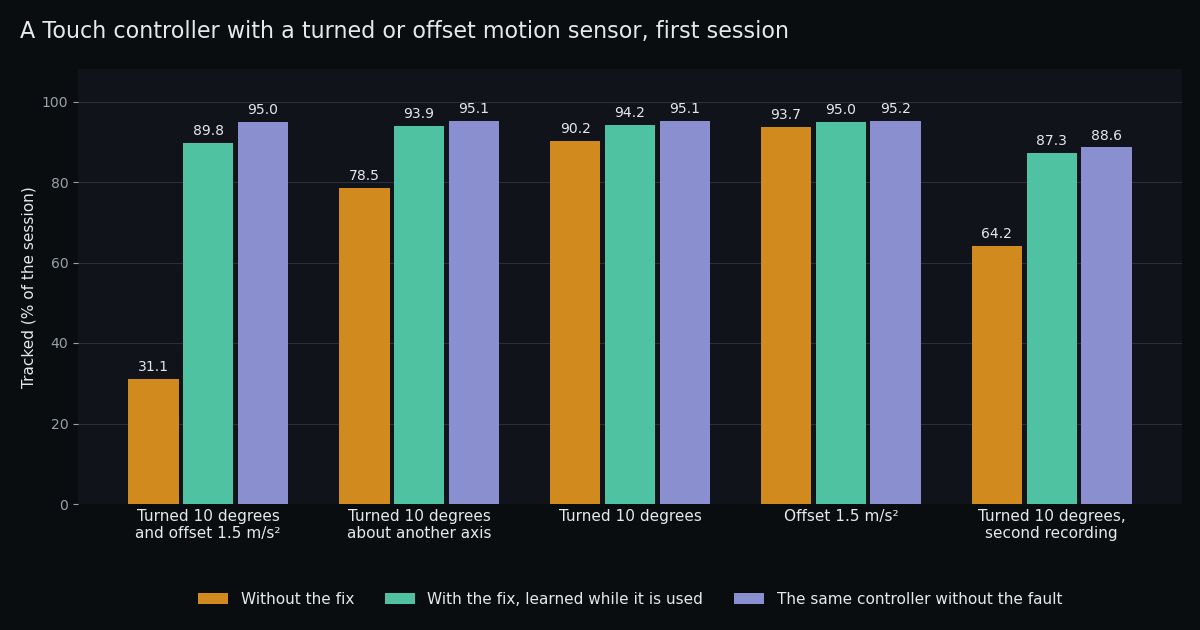
That’s the very first session, before anything is learned. From the next session on, the controller with both faults was tracked 95.19 to 95.30 % of the time, against 95.16 % with no fault at all. And on the two sessions I recorded on Windows, controllers without a fault track the same with the fix on or off.
What I can’t tell you yet is how it does on a real faulty controller, because none has been through it. If one of yours
froze or jumped, please try 0.1.5 and tell me on issue #5 how it tracks
now. riftlinux-setup controller-alignment status shows what it learned.
Fast punches
With that fixed, I put the headset on and threw some fast punches. The left controller kept sticking for a moment after them.
The recording showed what happened. Between camera frames, the tracker predicts where the controller should be, and it uses that prediction to check each new pose. After a fast punch, the prediction fell behind the hand by 10 cm or more, turned up to 35 degrees the wrong way. So the next poses, which were right, looked wrong, and got thrown away until the tracker gave up waiting and took them.
What helps is a small filter per controller that carries it from one camera frame to the next on its motion sensor, the way it’s done on Windows. 0.1.5 adds that, and two more things the punches asked for:
- Its own motion-sensor filter per controller. The prediction now keeps up with the hand.
- Three views that agree win. When the prediction is off anyway, three clear views of the controller that agree with each other correct it right away, instead of waiting for 0.3 s.
- The accelerometer is trusted less in a punch. At 100 m/s², even a tiny error in the accelerometer’s scale adds up to metres per second squared, and following it carried the controller off.
I replayed the same punch recording through each step:
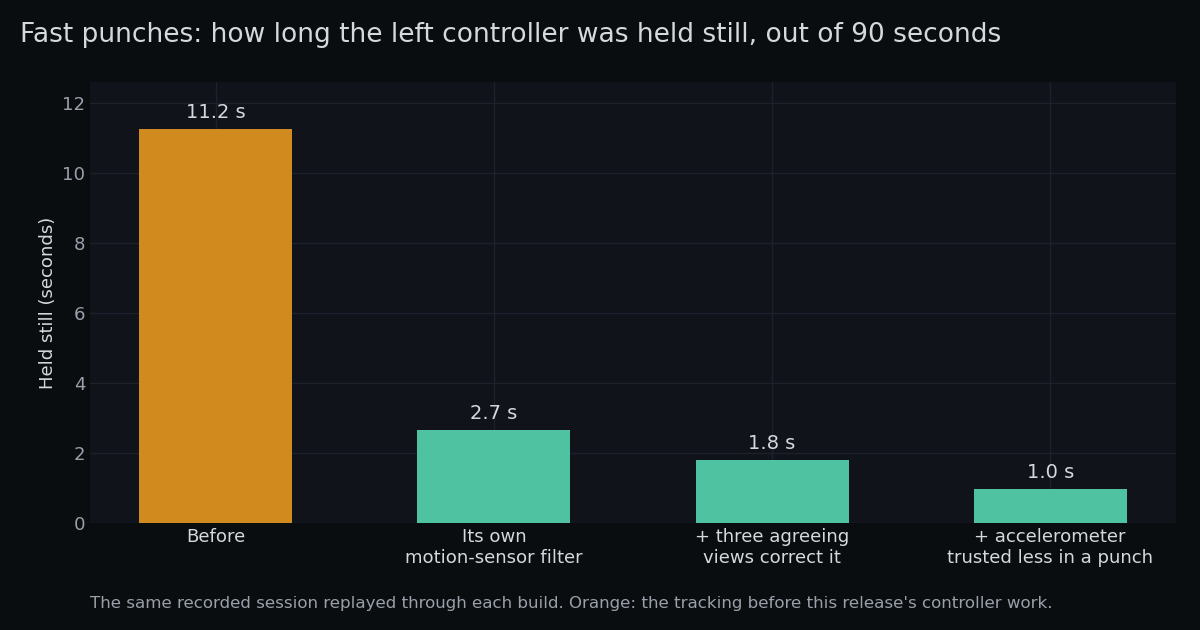
From 11.2 seconds of sticking down to 1.0, and never more than 0.2 s at a time. With the last fix below it’s 0.9.
A turn faster than the gyro can read
One freeze in that recording didn’t fit. The right controller stopped for almost 3 seconds in full view of both sensors, right after a fast wrist turn, and none of the fixes above touched it.
The answer was in the gyro. A Touch controller’s gyro can read turns up to 2000 degrees a second, and my wrist turn went past that. For 22 milliseconds the gyro was pinned at its limit, so the turn it reported was shorter than the turn my hand made. The motion sensor’s idea of which way is down came out of that turn about 10 degrees off. The check throws away poses more than 8 degrees off, so it threw them all away:
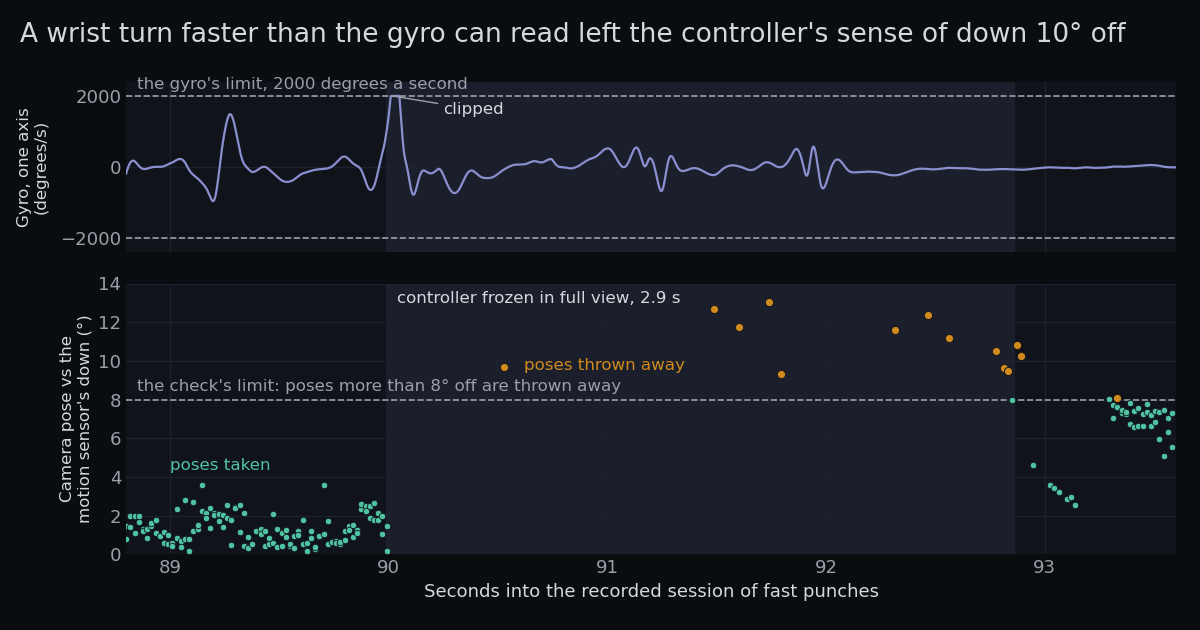
Before the turn, the poses agree with the motion sensor to within a couple of degrees. After it, they’re all over 8, and the controller sits frozen until the motion sensor slowly corrects itself.
Now, when the gyro hits its limit, the check allows for what the gyro couldn’t read, until a clear view of the controller sets its sense of down right again. On the same recording that freeze went from 3.03 s to 0.34 s. Sessions without such a turn track exactly as before.
Three LEDs, three and a half metres away
The last fix came from my own left controller, on release day. I tested at the back of my room, about 3.4 m from the sensors, and the left controller kept stopping and then sliding back into place. The right one was fine.
The recording showed why. At that distance the left controller was often seen by only three or four of its LEDs, and they sit just 3 to 4 pixels apart in the sensor’s picture. The tracker matched each LED to its nearest blob, and when two blobs were about as near, it gave up. Lost for half a second, the controller was held still, and when it was found again it slid up to half a metre to where my hand really was.
Three things changed:
- Every way of reading the LEDs is tried. With the motion sensor’s orientation known, the tracker tries every way the three or four blobs could be the controller’s LEDs, and keeps the one that fits clearly better than all the others.
- A few degrees off is no longer a reason to throw a view away. Both of my controllers read 4 to 5 degrees between their motion sensor’s down and their LEDs. The check that throws away views more than 8 degrees off now allows for each controller’s own offset.
- Found again, it’s shown where it is, the way Windows does it, instead of sliding there from where it was held.
On that recording the left controller was held still 5.2 seconds out of 149 instead of 10.3, and when it was found again it was 6 cm from where it was shown instead of 16 (median). For about 3 of those 5.2 seconds it was really out of view, where Windows holds a controller still too.
How it compares with Windows
I keep two sessions I recorded on Windows: the sensors’ camera frames, and where Windows tracked each controller. RiftLinux replays the same camera frames, so both see exactly the same thing. This is how much of each session each controller was tracked, counting the second a controller keeps moving after it leaves the sensors’ view, the same way Windows counts it:
| Windows | RiftLinux 0.1.5 | |
|---|---|---|
| Left controller, evening session | 92.8 % | 95.5 % |
| Right controller, evening session | 96.3 % | 97.7 % |
| Left controller, daytime session | 95.2 % | 95.4 % |
| Right controller, daytime session | 96.2 % | 96.5 % |
Neither controller jumped more than 5 cm between two frames in either session, same as on Windows.
What didn’t work
A controller you hold perfectly still shakes a bit more than on Windows, under half a millimetre at the median. I tried three ways to calm it: blending each camera correction in more slowly, doing that only while the controller is still, and trusting each camera frame less. Every one of them made the shake smaller by moving the controller further from where it really is, compared with where Windows put it. That’s not a trade I want to make for you, so 0.1.5 doesn’t. Windows gets both, which tells me its raw poses are cleaner before any smoothing, so that’s where I’m looking next.
Rift Home: a VR desktop made for RiftLinux
Rift Home started as a test bench. I needed a way to check that HDR video looked right in the headset, so I put a video window in VR. Then I wanted a second window next to it, then a way to move them around, then a keyboard, and bit by bit it grew into a full VR desktop. I built it for RiftLinux, and it runs on RiftLinux’s own OpenXR runtime. Its first version, 0.1.0, comes out together with this release.
It puts your normal Linux apps around you as windows, Wayland apps and X11 apps through XWayland, and you use them with the Touch controllers: point, click, right-click and scroll.
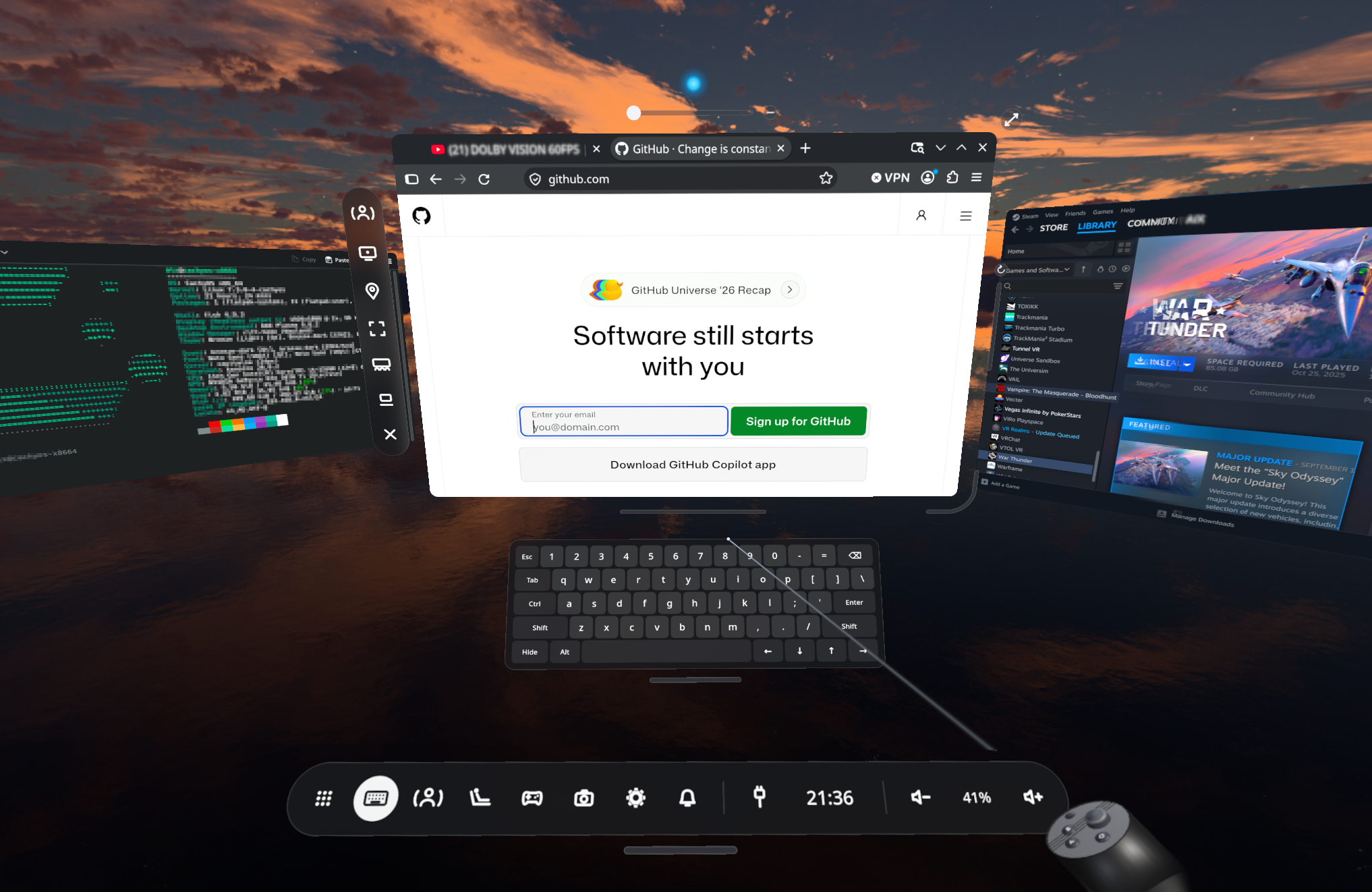
What you can do with it in 0.1.0:
- Grab a window to move it, pull it closer or push it away, resize it, tilt it or curve it.
- Pin a window where it is, or let it follow you. Rift Home remembers where every window was.
- Open apps from the Home launcher, with search and a card for every app that’s running.
- Use the dock for the keyboard, notifications, volume, the time and the network.
- Type on a virtual keyboard that opens right under the text field you clicked.
- Get your apps’ notifications in the headset, with their action buttons.
- Watch HDR video (HDR10 and HLG) in any Firefox or mpv window, and in Stremio through mpv.
- Turn a window into a big screen in cinema mode, with the room dimmed around it.
- Play Steam and Proton games in windows, with game mode turning the Touch controllers into a gamepad.
- Lie back in bed or on the sofa: hold grip and press B, or use the dock’s Recline button, and the windows turn to where you’re looking, even above you.
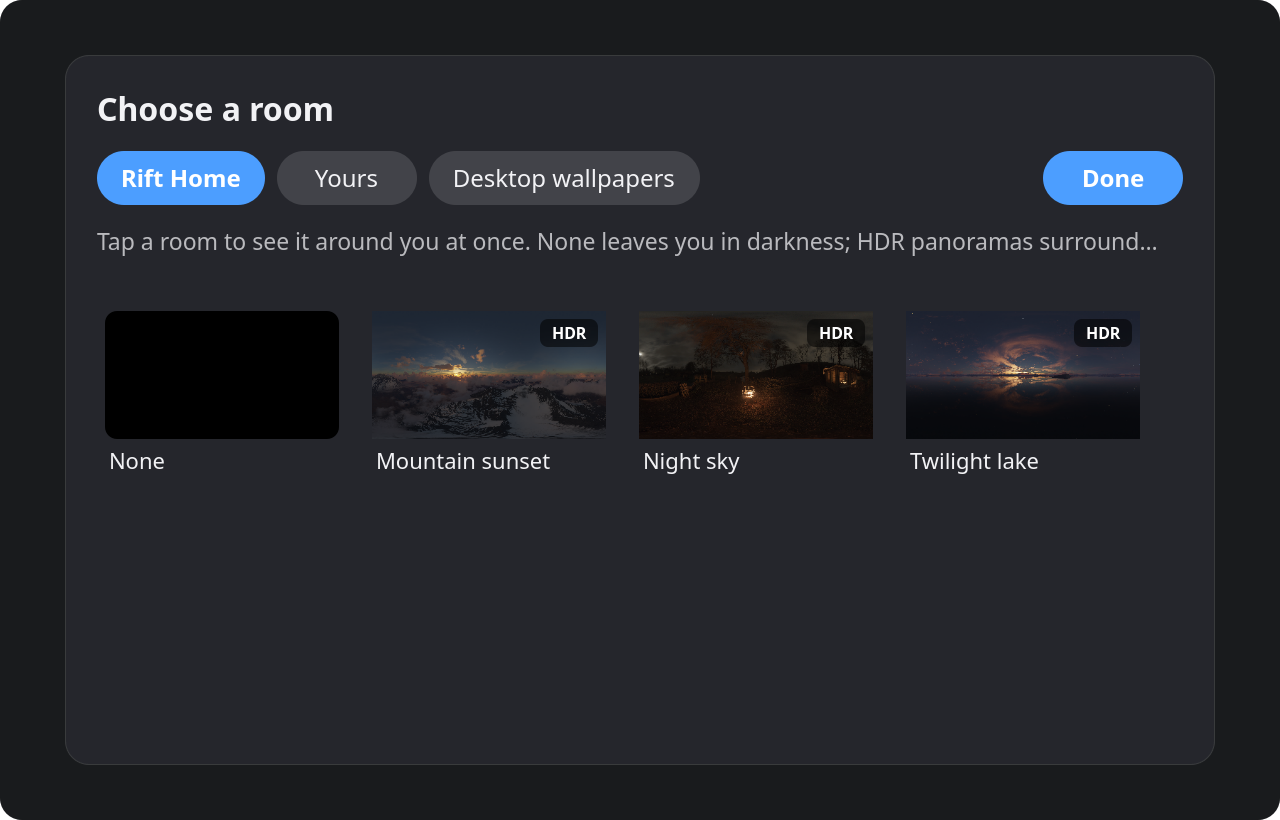
- Pick a room: three HDR panoramas (Twilight lake, Mountain sunset, Night sky), your own panoramas and photos, or your desktop wallpapers.
- Fit the headset with the lens test from the Rift’s own setup, a fine cross in each eye.
- Change Wi-Fi, wired network, Bluetooth, sound, date and time, power and the room’s look without taking the headset off.
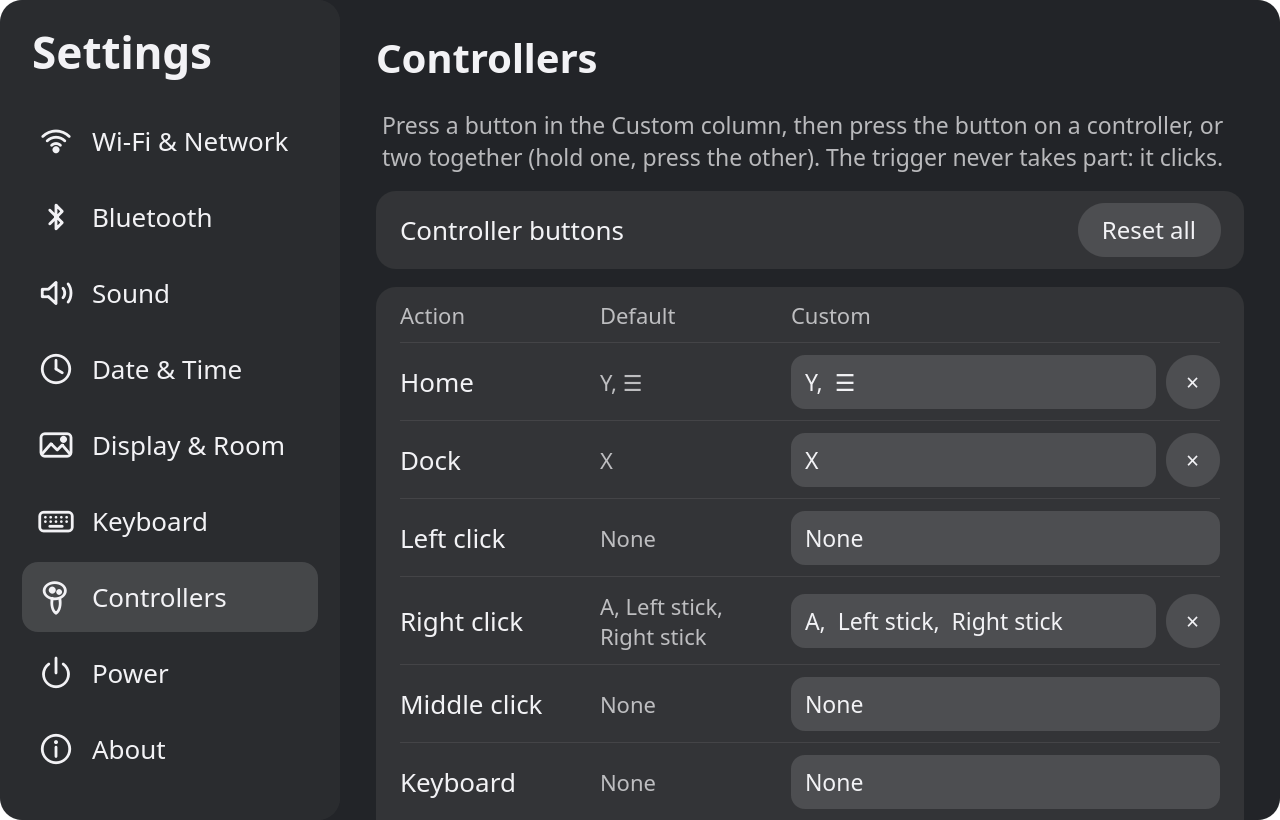
- Put any action on any button, or on two buttons pressed together.
You can start it two ways. Pick “Rift Home” on the login screen and it runs as its own Wayland session, with nothing else underneath. Or start it from your desktop’s app menu and it runs on top of your desktop. Close SteamVR first, since only one VR program can have the headset at a time. It needs RiftLinux 0.1.5 or later, and it’s for the Rift CV1 with Touch controllers.
So far I’ve only run it on CachyOS with NVIDIA’s 615 driver. The Fedora and Ubuntu packages install fine on clean systems, but nobody has tried them with a headset yet, and AMD and Intel graphics are untested. The virtual keyboard only has the US layout for now (a real keyboard uses your system’s layout). You can get it from github.com/AIIX/RiftHome:
sudo pacman -U rift-home-0.1.0-1-x86_64.pkg.tar.zst     # Arch, CachyOS
sudo dnf install ./rift-home-0.1.0-1.fc44.x86_64.rpm    # Fedora 44
sudo apt install ./rift-home_0.1.0-1_amd64.deb          # Ubuntu 26.10
On other distributions you can build it from source. The README explains how, and the getting started guide walks you through the first start.
The smaller things
The IPD slider that didn’t move
The CV1 reports where its IPD slider is, and RiftLinux used to turn that into millimetres on a scale of its own. It now uses the same scale as Windows, and SteamVR follows the slider as you move it, where before it only read it once at startup. The headset shows the distance as it changes, “IPD 63.5 mm”.
Then #6 showed something I didn’t expect: on some headsets the slider
doesn’t report at all. The lenses move, the number stays at 57.5 mm, and Windows shows the same.
For those, you can now set your IPD by hand in the Rift tab’s new IPD row or with riftlinux-setup ipd 63.5.
Steam’s update that hid SteamVR Home
This one came in just before the release, in #7, and the report did most of the work. After Steam’s newest client update, the headset worked fine, but SteamVR Home never showed up and games wouldn’t start. SteamVR was starting Home over and over, about five times a second.
The new Steam client moves its files around: ~/.steam/bin now leads to a folder called steamrt32, and that folder
has no steam-runtime in it. SteamVR Home’s launcher still looks for ~/.steam/bin/steam-runtime/run.sh, doesn’t find
it, and quits straight away. The reporter found that a link to Steam’s legacy runtime brings Home back, and also that
linking the copy in Steam’s old folder doesn’t, because that one is only a stub.
RiftLinux now makes that link by itself, every time SteamVR starts, at login and when you plug the headset in, and only
when it’s missing, so Steam’s older layout is left exactly as it is. riftlinux-setup check shows it, and riftlinux-setup repair fixes it
straight away.
Why SteamVR kept blocking the driver
Some of you had SteamVR block the RiftLinux driver at every start, and my fix in 0.1.4 didn’t help. The crash report showed why. It wasn’t the driver at all: lsfg-vk, Lossless Scaling’s frame generation for Linux, loads itself into every Vulkan program once it’s installed, and it crashed inside SteamVR’s server just as RiftLinux’s display was starting. SteamVR then blocks whichever driver was starting, which was mine. RiftLinux now keeps lsfg-vk out of SteamVR’s server, its own helper and its own runtime. Your games still get it.
And the rest
- A controller whose battery died, or that went out of radio range, used to keep spinning in SteamVR for as long as it was gone. Now its orientation holds, and it counts as not tracked once the radio stops hearing from it.
- A pose from only three LEDs barely pins down the distance. In one recording, three LEDs put a controller 42 cm closer than five LEDs had a moment before. Now such a pose gets thrown away when it lands more than 20 cm from a strong pose just before, and on that recording the left controller’s jumps went from 11 to 0.
- When your hand goes behind your back, the controller keeps moving on its own motion sensor for up to a second, then stays put, still turning with your hand, and is shown where it is when the sensors find it again.
- If OpenHMD or another Rift driver held on to the headset,
riftlinux-setup checknow says so, andriftlinux-setup repairgets it back. - HDR video no longer has a hard ring around bright glows.
- Without SteamVR, when the app you’re in closes, the one before it comes back, and the Rift panel has a Switch application button. WebXR works in Chromium (the guide shows how), Unity games no longer show black wedges at the bottom of each eye, and there’s a Nix flake and a NixOS module.
Pick the settings for your setup
Every setting is one riftlinux-setup command, and every old behaviour is still there if you want it back. The
Settings page lists them all.
A controller froze or jumped before
Nothing to do, it’s learned while you play. If you repaired or swapped a controller,
riftlinux-setup controller-alignment forget (with SteamVR closed) starts it from scratch.
A controller tracks worse than with 0.1.4
riftlinux-setup controller-alignment off tracks every controller the way it did before the fix, and
riftlinux-setup controller-tracking 0.1.4 brings back the controller tracking from 0.1.4. If you need either, please
tell me on issue #5.
Your hands often leave the sensors’ view
If a controller drifts off while it’s out of view, riftlinux-setup controller-coast 300 goes back to the shorter
behaviour from before. For longer, use a higher value, up to 2000.
The IPD number doesn’t change when you move the slider
Measure your IPD and set it in the Rift tab’s IPD row, or with riftlinux-setup ipd and your number.
riftlinux-setup ipd test shows what the slider reads while you move it, and riftlinux-setup ipd auto follows the
slider again.
You have lsfg-vk installed
Nothing to do. If SteamVR blocked the driver before, run riftlinux-setup repair once to lift the block.
Thick face pads, a face shield, or a covered wear sensor
riftlinux-setup wear-sensor test shows what the sensor between the lenses reads, and the
Settings page explains what to do with it.
NVIDIA’s 615 driver and long sessions
NVIDIA’s 615 driver holds on to a little memory every time a program sends work to the graphics card. You notice it when something runs for a long time, like a VR desktop. Troubleshooting has the workaround from NVIDIA’s forum.
Try it
sudo apt install ./riftlinux_0.1.5_amd64.deb                  # Debian, Ubuntu, Linux Mint, Pop!_OS
sudo pacman -U riftlinux-0.1.5-1-x86_64.pkg.tar.zst           # Arch, CachyOS, EndeavourOS, Manjaro
sudo dnf install ./riftlinux-0.1.5-1.x86_64.rpm               # Fedora
tar xf riftlinux-0.1.5-x86_64.tar.gz && sudo ./riftlinux-0.1.5-x86_64/install.sh   # any other distribution
Then restart Steam once.
- Download: RiftLinux 0.1.5
- Getting started: riftlinux.com
- Source code and issues: github.com/AIIX/RiftLinux
Everything here was tested on NVIDIA. I don’t have AMD or Intel hardware, so if you try it on either, please let me know how it goes. The logs people sent on issue #5 are what found the controller problem.